Following a request
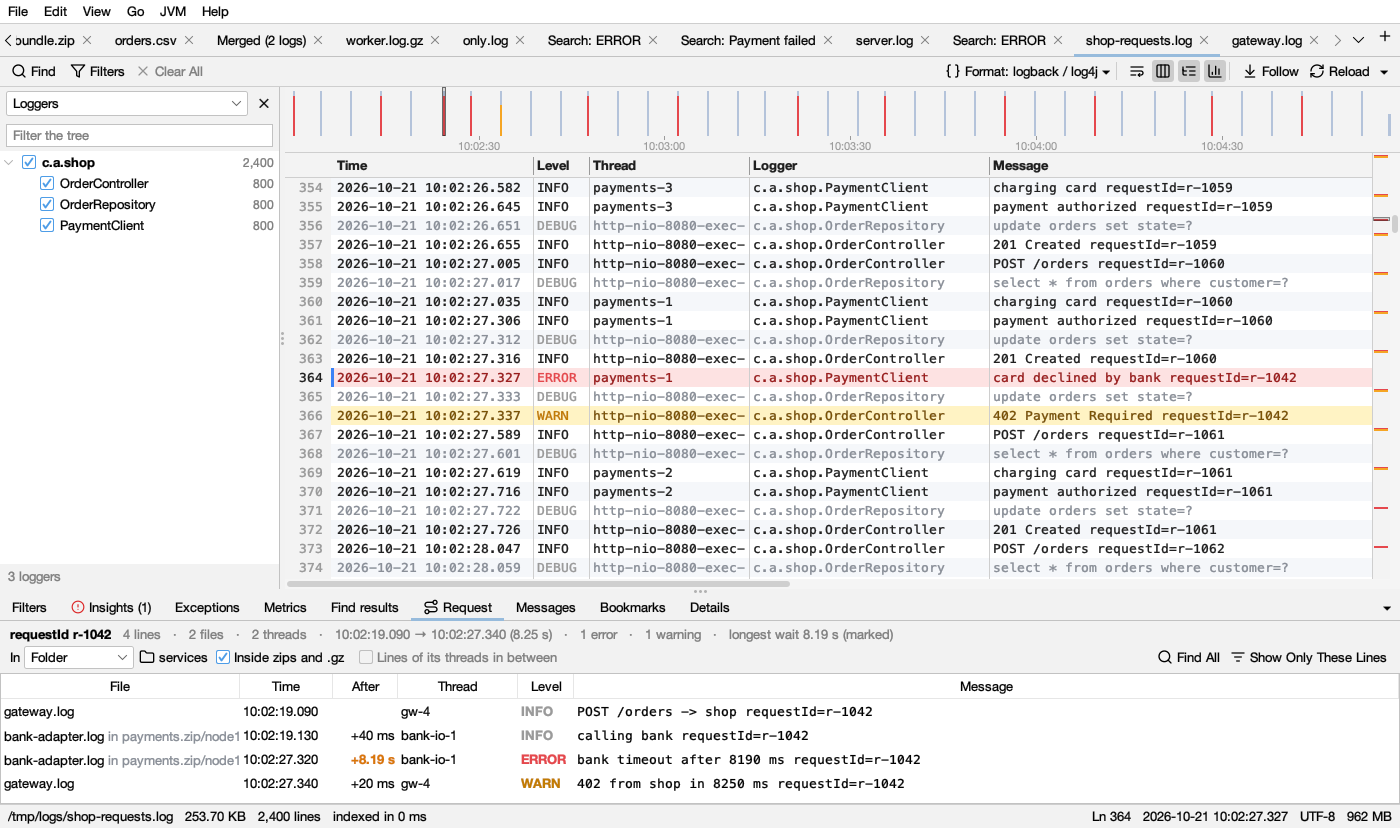
The Request tab shows every line of one request in order, across threads and files, with the time between them.
Starting
- Right-click a line with a trace or request ID → Follow traceId 4bf92f…, or press Ctrl+Shift+R (⇧⌘R on macOS, Go → Follow This Line’s Request).
- To follow anything else (an order number, a user), select it first, then right-click → Follow “…” Through the Log.
If the line has no ID, Logsift says so: select the text to follow and try again.
IDs it recognizes: traceId=…, request_id: …, X-Request-Id, "correlationId":"…" and any other key ending in id, the [app,traceId,spanId] and [traceId-spanId] that tracing libraries add, a W3C traceparent, and UUIDs. Process, thread and span ids are left out. With several IDs on a line, traces come first, then requests.
What it shows
The top line sums it up: 6 lines · 2 threads · 10:02:19.097 → 10:02:27.337 (8.24 s) · 1 error · longest wait 8.20 s (marked).
| Column | Shows |
|---|---|
| File | Which file the line is in (only when the request spans several files) |
| Time | When it happened |
| After | Time since the line before |
| Thread, Level, Message | As in the log. Levels: red errors, dark amber warnings |
The longest wait is in bold amber in the After column, and the table scrolls to it. That is usually where the time went. It is marked when it is at least a third of the whole request and 100 ms or more.
Click a line to go there in the log. Double-click a line of another file to open that file there.
Options
- In: This log / All open logs / Folder picks where to look. With Folder (the log’s own, or any folder or
.zipyou choose), every file in it is searched; Inside zips and .gz (on by default) looks inside archives too. Lines from all files are put in one order by time. - Lines of its threads in between: logs often name the ID on only some lines of a request. This adds the lines its threads wrote between its first and last line, until a thread names another request’s ID. These lines are grayed ( in dark mode). Not available for a folder.
- Find All and Show Only These Lines run the same search in the log.
Up to 5,000 lines of one request are shown.