Troubleshooting and FAQ
Installing
macOS says the app is damaged or can’t be opened. The downloads aren’t code-signed yet. Run xattr -dr com.apple.quarantine /Applications/Logsift.app.
Windows SmartScreen warns. Choose More info → Run anyway.
Logs
The Reload button turned amber: Reload (+1.2 MB) or Reload (file replaced). The file changed on disk and Reload Automatically is off. Press F5, or turn on Reload ▾ → Reload Automatically (Follow turns it on too).
The log has no colours, no timeline or no columns. Logsift doesn’t know its layout. Click Format: …▾ in the log’s bar to pick one, or Define Its Format… (see Settings). Level colours in the plain view need the words ERROR, WARN and so on in capitals; your own format’s level column works with any spelling.
Logsift picked the wrong format. Click Format: …▾ in the log’s bar and choose another for that file (it is remembered), or Plain text.
Odd characters (é, �). The file isn’t in the encoding Logsift detected. Use View → Encoding, or set Text that isn’t UTF-8 in Settings.
Opening shows Waiting for the file. The file is on a network or cloud drive that fetches it first. Wait, or Cancel.
A line is cut off. Lines over 64 KB are cut for display. Search still sees the whole line.
Times look shifted. Times are shown as written in each log; time zones are not converted.
A merged log has lines out of order at the end. Lines that arrive late in a merge are added at the end, not put in time order.
A log from a zip or a web address doesn’t grow. Those are copies made when opened. Open the file itself, or use Open Remote to follow a log on a server.
Remote logs (SSH)
Could not connect: login failed (check user, password or key). Check the user name, the password or key, and the key’s passphrase.
The status bar says ⚡ reconnecting…. The connection dropped. Logsift tries again by itself, waiting a little longer each time (up to about 30 seconds).
The host key changed
The question about the server’s key says REMOTE HOST IDENTIFICATION HAS CHANGED. The server now has another key than the one in ~/.ssh/known_hosts. That is normal after a server was reinstalled, and a warning sign otherwise. Answer No unless you know why it changed; then the connection fails with HostKey has been changed. Ask the server’s owner, then remove the old key with ssh-keygen -R host.
Web addresses
The certificate of … isn’t trusted. Neither Java nor this computer trusts it. On a company network, a proxy that checks traffic often uses its own certificate. Choose Open Anyway only if you trust the network and the server.
The server wants a user and password or a token (401) / refused access (403). Choose User and password or Token in the Open URL window.
JVMs
No Java programs in the list (this computer). Only programs running as your user are listed. This Logsift cannot list Java programs; set a JDK folder means its Java runtime can’t attach: give a JDK folder (for jcmd) in the Attach window’s This computer tab.
Could not take a dump: no jcmd found (set the JDK folder) … (over SSH). Give the JDK folder on the server in the Attach window, for example /opt/jdk-21. On Linux and macOS servers Logsift otherwise uses async-profiler.
sudo needs a password. The JVM runs as another user. Type your sudo password when asked; Logsift keeps it only while it runs. Turn off Use sudo for JVMs of other users to skip those JVMs.
JMX: nothing answers on that port. The JVM needs -Dcom.sun.management.jmxremote.port=…, and -Djava.rmi.server.hostname set to an address you can reach. the JMX port refused the user or password: check them, and SSL.
async-profiler doesn’t run on this computer / server. It runs on Linux (x64, ARM64) and macOS JVMs. Use Flight Recorder.
The kernel doesn’t allow perf events here. CPU time was sampled with a timer instead (no kernel frames). To allow them: sysctl kernel.perf_event_paranoid=1.
this JVM can’t count without a full GC. Turn on Only live objects for the histogram, when a full GC is all right now.
No Room for the Heap Dump. The JVM’s machine has too little free disk where the dump would go, or the folder is in memory (tmpfs). Give another folder on that machine with room.
Logsift left files on the server. On purpose: Logsift never removes files on a server. See what it writes and where, and remove them when you are done.
Heap dumps and GC logs
Could not read this heap dump: not a heap dump (.hprof). Only HotSpot .hprof files are read. Unpack a .hprof.gz first.
Reading this needs about X of free disk space for its index. Big dumps keep their index on disk, in ~/.logsift/heap-index. Free up space, or read the dump on a server.
There are no garbage collections in … that Logsift can read. The log isn’t a HotSpot GC log, or it is cut short. See GC logs for the options that write one.
When something goes wrong
A window says Something went wrong. Logsift hit an unexpected error; you can keep working. Copy Details or Report on GitHub (no log contents are included). Errors are also written to ~/.logsift/errors.log (Help → Open Error Log). The window opens for the first error of a session, and whenever Logsift runs out of memory; later errors only count in the status bar.
The status bar says ⚠ 2 errors. In amber at the right: Logsift hit that many unexpected errors this session (a bug in Logsift, not in your log). A view may not have updated: if something looks wrong, reopen the file. Click it, or Help → Show Errors…, for the list: when each happened, a line about it, and the details of the one selected.
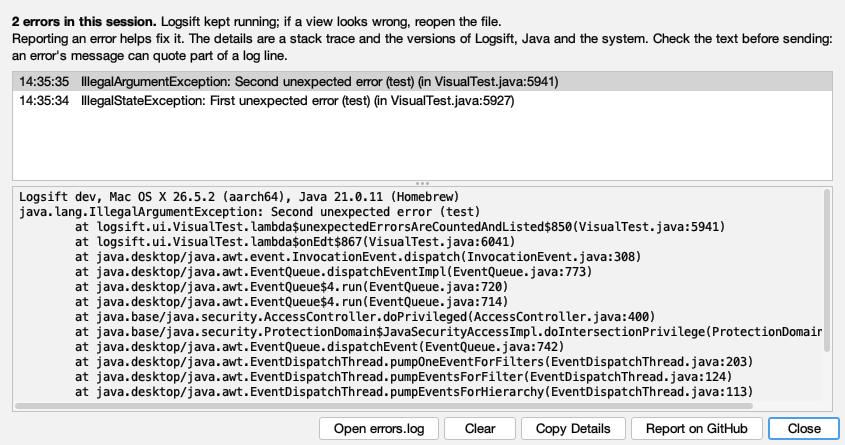
- Report on GitHub opens a new issue with the details filled in. They are a stack trace and the versions of Logsift, Java and your system. Check the text before sending: an error’s message can quote part of a log line.
- Copy Details copies them, to send another way.
- Open errors.log opens the file with every error, also from earlier sessions.
- Clear hides the count until the next error (errors.log keeps them).
The same error again counts once. Failures that aren’t bugs, like a file that can’t be read or a server that doesn’t answer, are said where they happen and don’t count here.
Logsift ran out of memory. Close some tabs or searches and try again.
Reporting a bug. Help → Report a Bug or Suggest a Feature… opens a GitHub issue with your version and system filled in. Please remove anything private from sample logs.
FAQ
Check for Updates fails behind a company proxy (PKIX, certificate). Logsift trusts the certificates this computer trusts, and if the proxy’s certificate still isn’t trusted it checks without checking the certificate. Only the version number is read, and Download always opens GitHub’s page for that version, so nothing else is taken from the proxy’s answer.
Does Logsift send my logs anywhere? No. Its only network connections are the daily update check (turn it off with Help → Check for Updates Automatically) and the servers you choose: SSH servers, JMX ports and web addresses.
How big a file can it open? Logs of 10 GB and more open in seconds. The index costs about 12 MB per 100 million lines, and a single line over 256 MB is only searched in its first 256 MB.
Does it change my log files? No. Logs are only read. Exports write new files.
Can I run two windows? Files opened while Logsift runs go to the same window. Piped input (… | logsift -) gets its own.
Where are my settings? See Settings.