Insights and messages
Insights
The Insights tab (next to Filters, below the log) tells you at a glance what is going on in the log. It fills in by itself once a file is read, for files up to 2 GB; for bigger files, when you open the tab. Its title counts the red findings: Insights (6), with a red icon, so you see them without clicking.
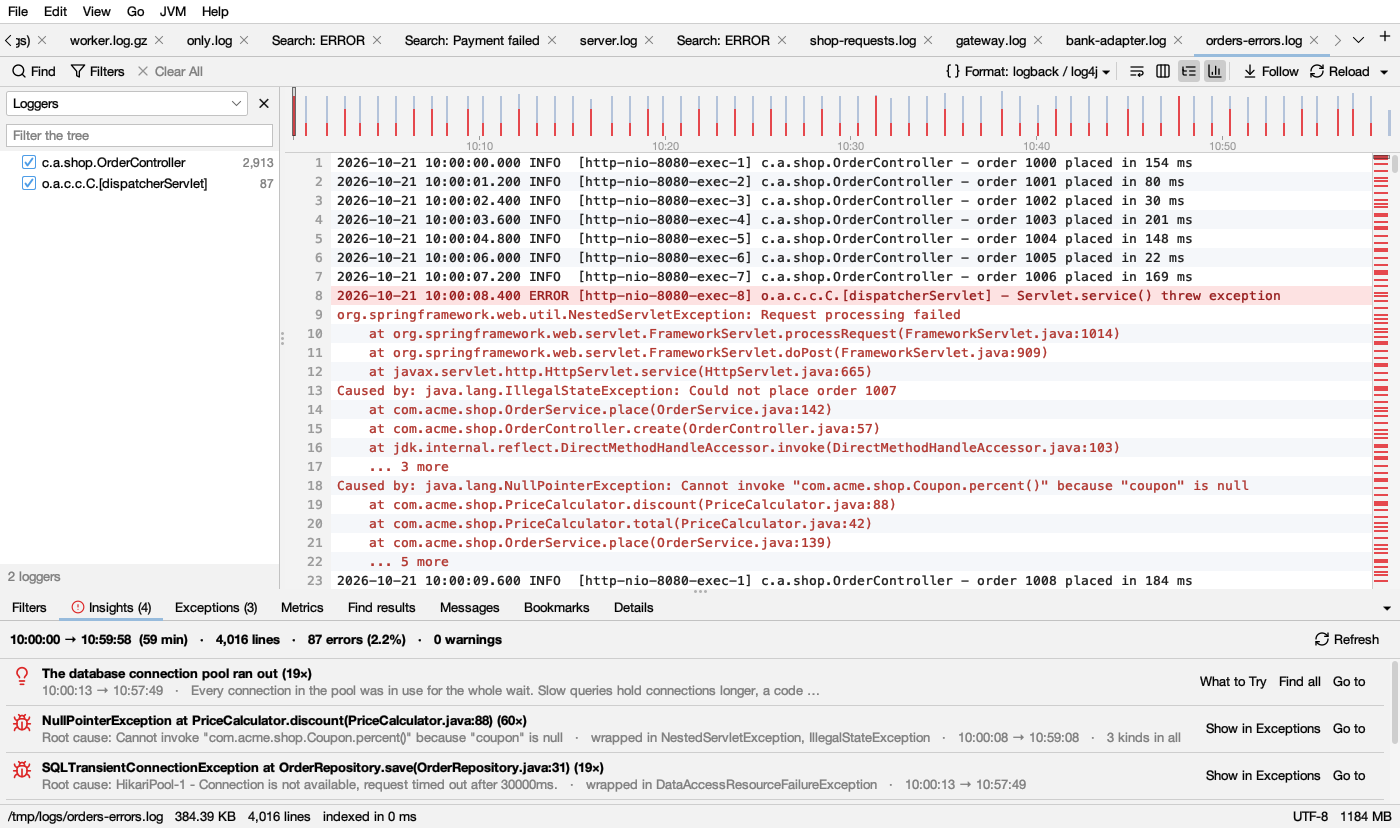
At the top: the time the log covers, how many lines, errors and warnings. Refresh looks again after the log grew (it says how many new lines there are).
Colours
Each finding has an icon in its colour (the same in light and dark mode):
- red: errors (bursts, new errors, frequent errors, exceptions, serious known problems).
- amber: warnings (silences, restarts, things that never ended, spikes, the most common warning, lighter known problems).
- blue: for information (noise).
- green: Nothing unusual.
Findings are sorted red first, then by kind: bursts, new errors and known problems, exceptions, spikes, things that never ended, restarts, silences, errors, warnings, noise.
The findings and their rules
| Finding | Colour | When | What to do |
|---|---|---|---|
| Error burst from – to: N errors, N× the usual rate | red | Errors came at least 4 times faster than on average (and at least 5 in a slice of time). Needs 10 errors or more and a log with times. At most 3 bursts | Show these minutes shows just that time. Look at what happened just before it started |
| An error message with New: began at … | red | One of the 4 most frequent error messages first appeared after the first tenth of the log (and at least twice). stopped at … when it ended before the last tenth | Something changed at that time: a deploy, a dependency going down |
| An error message with N times · first → last | red | One of the 4 most frequent error messages, there from the start | x% of all errors tells you which one to fix first |
| Exception at method (N×) | red | The 2 most frequent exceptions by root cause | Show in Exceptions (see Exceptions) |
| A known problem (N×) | red or amber | One of about 30 problems that look the same in every log (below) | What to Try explains it |
| N things started and never ended | amber | Something that starts and ends (a job, a request) started and has no end. At most 2 | Show in Metrics (see Metrics). Often what hung |
| High: measurement, from – to | amber | A measurement in the messages was 3 times its usual median or more for a stretch (but not the whole log). Needs 50 values with times | Show these minutes, Show in Metrics |
| Started N times | amber | A start-up message (Started … in N seconds, Tomcat started on port, listening on port …) appears 2 times or more | The program restarted: look just before each start for why it stopped |
| No lines for duration | amber | A gap with no lines of at least 1 minute and 8 times the usual gap. At most 3 | The program was quiet, stuck or not running |
| Most common warning | amber | The most frequent warning message | |
| One message is x% of the log | blue | One message is a quarter of the lines or more (logs of 1,000 lines or more) | Hide it to see the rest |
| Nothing unusual | green | No red or amber finding |
For files over 512 MB, the never-ended and spike findings are worked out when you open the Metrics tab.
Buttons on a finding
- Go to (or click the row): goes to its line.
- Show these minutes: shows only the lines of that time. Clear All in the log’s bar brings back the rest.
- Find all / Show only / Hide: that message’s lines.
- What to Try (known problems): What it usually means and What to try.
- Show in Exceptions, Show in Metrics.
- Open Heap Dump (out of heap memory): opens the dump the JVM wrote, see Heap.
Known problems
| Problem | Colour | What to try, in short |
|---|---|---|
| The JVM ran out of heap memory | red | Compare heap histograms over time, or profile live objects. Add -XX:+HeapDumpOnOutOfMemoryError. If nothing grows, raise -Xmx |
| The JVM ran out of Metaspace | red | Look for classes generated over and over. Raise MaxMetaspaceSize only if that many classes is expected |
| The JVM could not start more threads | red | Take a thread dump and look for many threads in pools with the same name. Check ulimit -u and the container’s pids limit |
| The JVM ran out of direct memory | red | Profile native memory |
| Endless recursion (StackOverflowError) | red | The repeating frames in the stack are the cycle |
| The JVM crashed | red | Find the hs_err_pid file: its Problematic frame names the library. Update it or the JDK |
| Long garbage collection pauses | amber | If the heap after GC keeps growing, look for a leak; else more heap or CPU. See GC logs |
| The database connection pool ran out | red | Look at what ran just before (slow queries, bursts). Compare the pool size with the threads that use the database |
| A thread pool was full | red | Take a thread dump while it happens: what the pool’s threads wait on is the cause |
| Too many open files | red | Count open files over time. If they grow, find what isn’t closed; else raise ulimit -n |
| The disk is full | red | df -h; check log rotation and temp folders |
| The port was already in use | red | Find what uses it, stop it, or use another port |
| The application failed to start | red | Read the Description and Action lines just after |
| A certificate is not trusted | red | Add it to the JVM’s trust store |
| A host name could not be resolved | red | Check the host name; nslookup on the server |
| Connections were refused | amber | Was the service up then? Compare the address with its settings |
| Calls to another service timed out | amber | Look at that service’s log at the same time (merge the logs by time) |
| Database deadlocks | red | Touch rows in the same order, keep transactions short, retry |
| Waits for database locks timed out | amber | Find long transactions |
| The database refused more connections | red | Add up the pool sizes of every instance and compare with the database’s limit |
| Kafka consumers were thrown out of their group | amber | Process batches faster, fewer records per poll, or a longer poll interval |
| Calls were rate limited | amber | Slow down or batch the calls, retry with backoff |
| The process was killed (out of memory?) | red | Compare the container’s memory limit with -Xmx plus metaspace, threads and direct memory |
| Web workers were killed for taking too long (gunicorn) | red | Find what those requests waited on |
| Errors in asyncio tasks were never handled | amber | Keep a reference to every task and await it |
| Background tasks were retried (Celery) | amber | Look at a task’s first failure; for lost workers, memory limits |
| Python ran out of memory | red | Process data in chunks |
| Endless recursion (RecursionError) | red | The repeating frames are the cycle |
| The database could not be reached (Python) | red | Check the database at that time |
Messages (top messages)
The Messages tab groups the lines into kinds of messages and counts them, most frequent first. Parts that change (numbers, IDs, durations) are shown as ∗, so Database connection lost after 26579 ms and … after 812 ms count as one. Stack traces count with their line.
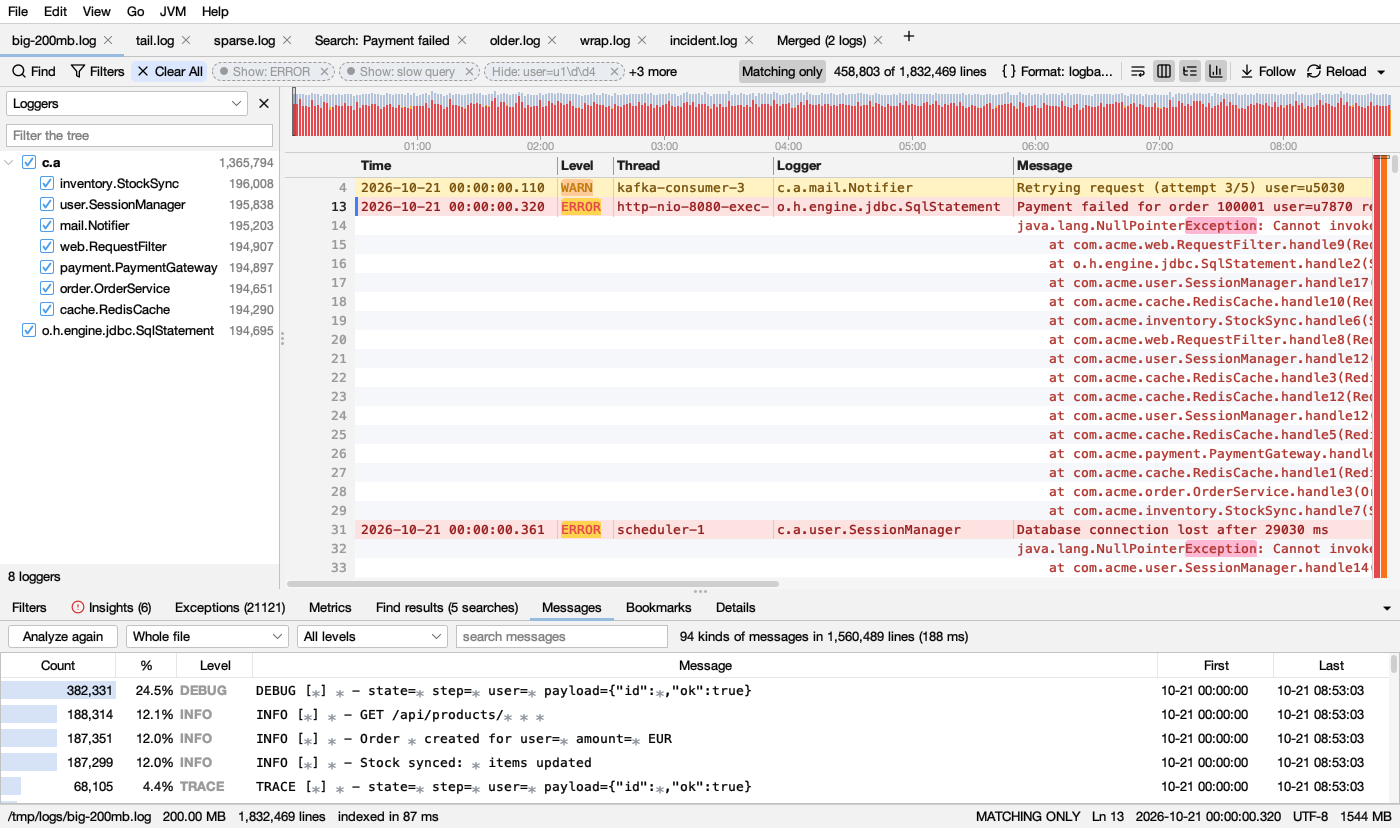
- Analyze (later Analyze again) counts. Whole file or Lines shown by filters (only the lines your filters and time range show).
- The level list: All levels, Errors, Warnings, Errors and warnings. Errors answers “what is going wrong?” in seconds.
- search messages filters the list.
| Column | Shows |
|---|---|
| Count | How many lines, with a bar as long as its share of the top message |
| % | Share of the counted lines |
| Level | red for errors, dark amber for warnings, gray for the rest |
| Message | The message, ∗ for the parts that change |
| First, Last | When it first and last appeared (or line numbers when the log has no times) |
Double-click a message to find all its lines. Right-click: Find All, Show Only These Lines, Hide These Lines (hide noise), Mark These Lines, Copy Message. Select several messages to hide them all at once.