Thread dumps
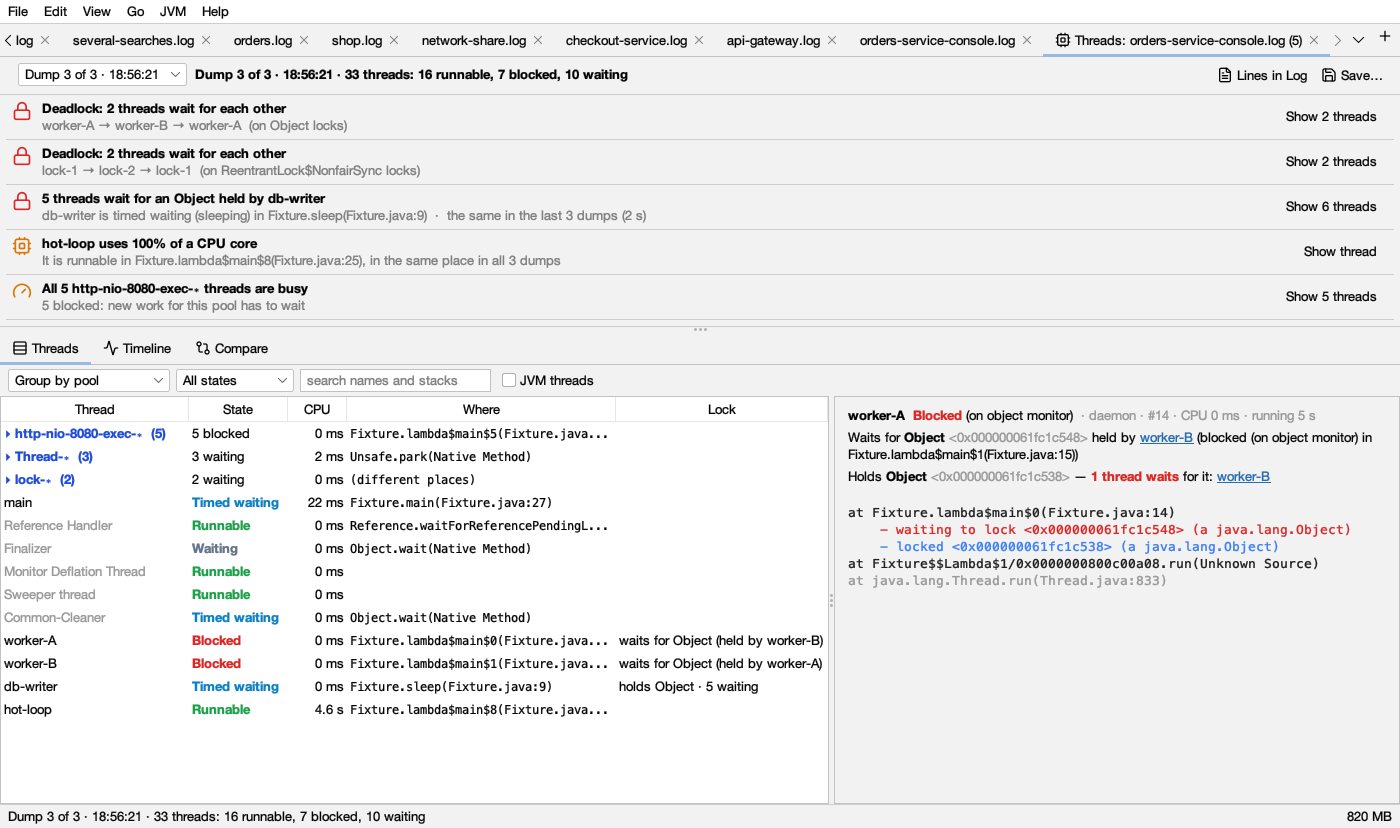
The Threads tab reads Java (and Python) thread dumps and starts with what stands out: deadlocks, threads queueing for a lock, stuck or busy threads, full pools.
Getting thread dumps
- JVM → Open Thread Dump… reads
jstackandjcmd Thread.printoutput, the plain and JSON files ofjcmd Thread.dump_to_file(with virtual threads), and dumps saved by Logsift. - Dumps inside a log: a log with
kill -3dumps in it (a console log,catalina.out,docker logsoutput) shows a bar offering Analyze Threads. JVM → Analyze Thread Dumps in This Log does the same for any open log. - Python:
py-spy dumpoutput andfaulthandlerdumps open the same way. - A running JVM: JVM → Attach to a Running JVM…, then Take Dump (see JVM connections).
Several dumps in one file, or taken some seconds apart, are read as a series. With a series you also get stuck threads, CPU use, the timeline and compare.
The tab is named Threads: source. When it found problems, their number follows: Threads: app.log (4).
The top bar
- Dump i of n · time picks the dump to look at (shown when there are several). Next to it: 33 threads: 16 runnable, 7 blocked, 10 waiting (waiting includes timed waiting).
- Take Dump (a running JVM only): takes a dump now. The JVM stops for a moment: milliseconds, more with many threads.
- Record…: takes several dumps some seconds apart (default 6 dumps, 5 seconds apart). Stop ends it early.
- Profile… and Heap… (a running JVM only): see Profiling and Heap.
- Lines in Log (when the dumps belong to a log): shows only the lines the selected thread wrote.
- Save… writes all the dumps as a text file that opens again here, or in any other tool.
Findings
The top of the tab lists what Logsift found, worst first. Each row has an icon coloured by how serious it is (the same in light and dark mode):
- red: a problem now (deadlocks, long lock queues).
- amber: worth a look.
- blue: for information.
- green: nothing unusual.
Click a row, or Show N threads, to list just those threads. A chip Showing N threads of: … appears; click its ✕ to see all threads again. A thread named by one finding isn’t repeated in later ones.
| Finding | Colour | When | What to do |
|---|---|---|---|
| Deadlock: N threads wait for each other | red | Threads wait in a circle, each for a lock (monitor or ReentrantLock) the next one holds. They will never go on |
The detail shows the circle (worker-A → worker-B → worker-A). Change the code so they take locks in the same order. Only a restart frees them |
| N threads wait for a Lock held by thread | red with 5 or more waiting, or when the same thread held it across more than one dump; else amber | 2 or more threads wait for one lock | The detail says what the holder is doing. Speed that up, or hold the lock for less time |
| Thread uses NN% of a CPU core | amber from 80%, else blue | With several dumps: 25% of a core or more between the first and last dump. With one dump: 50% or more on average since the thread started (threads running 10 s or more). At most 5 are listed | Look at its stack, or profile the JVM to see where the CPU goes |
| Thread stuck in method | amber | Same state and the same stack in every dump (needs 2 dumps or more). Idle and sleeping threads don’t count | It is doing the same thing for the whole time: a slow call, a lock, or an endless loop |
| Thread waiting in method for time | blue | Like stuck, but waiting or timed waiting in your own code | Usually fine; check what it waits for |
| All N pool threads are busy | amber | Every thread of a pool of 4 or more (http-nio-8080-exec-∗) is doing something |
New work for the pool has to wait. Find what the threads wait on; a bigger pool only helps if they wait on something that has room |
| Threads grew from A to B | amber | The count grew by 10 or more, and by 20% or more, across the dumps | The detail names the pool that grew. Threads that are never ended leak memory too |
| Nothing unusual | green | None of the above | Take a few dumps some seconds apart to see stuck threads and CPU use |
Idle threads (waiting for work) are left out of most findings. A thread counts as idle when it waits in a pool for a task, in a queue’s take/poll, in accept or a selector, and the like. A thread waiting on a database, connection pool or HTTP call is not idle: that is work.
Thread states and their colours
The same colours are used in the State column, the stack header and the timeline:
| State | Light | Dark | Means |
|---|---|---|---|
| Runnable | green | Running, or ready to run (also in native code, such as reading a socket) | |
| Blocked | red | Waiting to enter a synchronized block another thread holds |
|
| Waiting | slate gray | Waiting with no time limit (wait(), park(), join()) |
|
| Timed waiting | sky blue | Waiting with a time limit, or sleeping | |
| New, Terminated, Unknown | gray | Not started, ended, or the dump doesn’t say |
For Python dumps, an active thread shows as runnable and an idle one as waiting.
Threads
The threads of the selected dump.
- Group: No groups, Group by pool (the default:
pool-3-thread-∗), or Group by same stack (threads doing exactly the same thing). Click a group’s header to open or close it. - State filter: All states, Runnable, Blocked, Waiting (waiting and timed waiting), Busy (not idle).
- search names and stacks filters by text in thread names and methods.
- JVM threads (off by default) also shows the JVM’s own threads (GC, compiler, VM threads).
| Column | Shows |
|---|---|
| Thread | The name. Idle threads are grayed |
| State | The state in its colour (see above). Hover for more, such as sleeping or parking |
| CPU | CPU time the thread used |
| Where | The first frame that isn’t the JDK’s: where in your code it is |
| Lock | waits for … (held by X) or holds … · N waiting |
Click a header to sort. Right-click a thread → Show Lines of “…” in log, when the dumps belong to a log.
The stack
Click a thread to see its stack on the right:
- The header: its name, its state in the state colour, then daemon, id, CPU and how long it has run.
- Waits for Lock held by thread and Holds Lock — N threads wait for it, each thread a link. Click one to go to that thread.
- Frames: your own code in full colour, the JDK’s (
java.,javax.,jdk.,sun.,com.sun.) grayed. - Lock lines under a frame: waiting to lock in red, parking to wait for and waiting on in amber, locked in blue ( lighter in dark mode).
Timeline
One row per thread and one cell per dump, coloured by state (see the colours above). It needs two dumps or more.
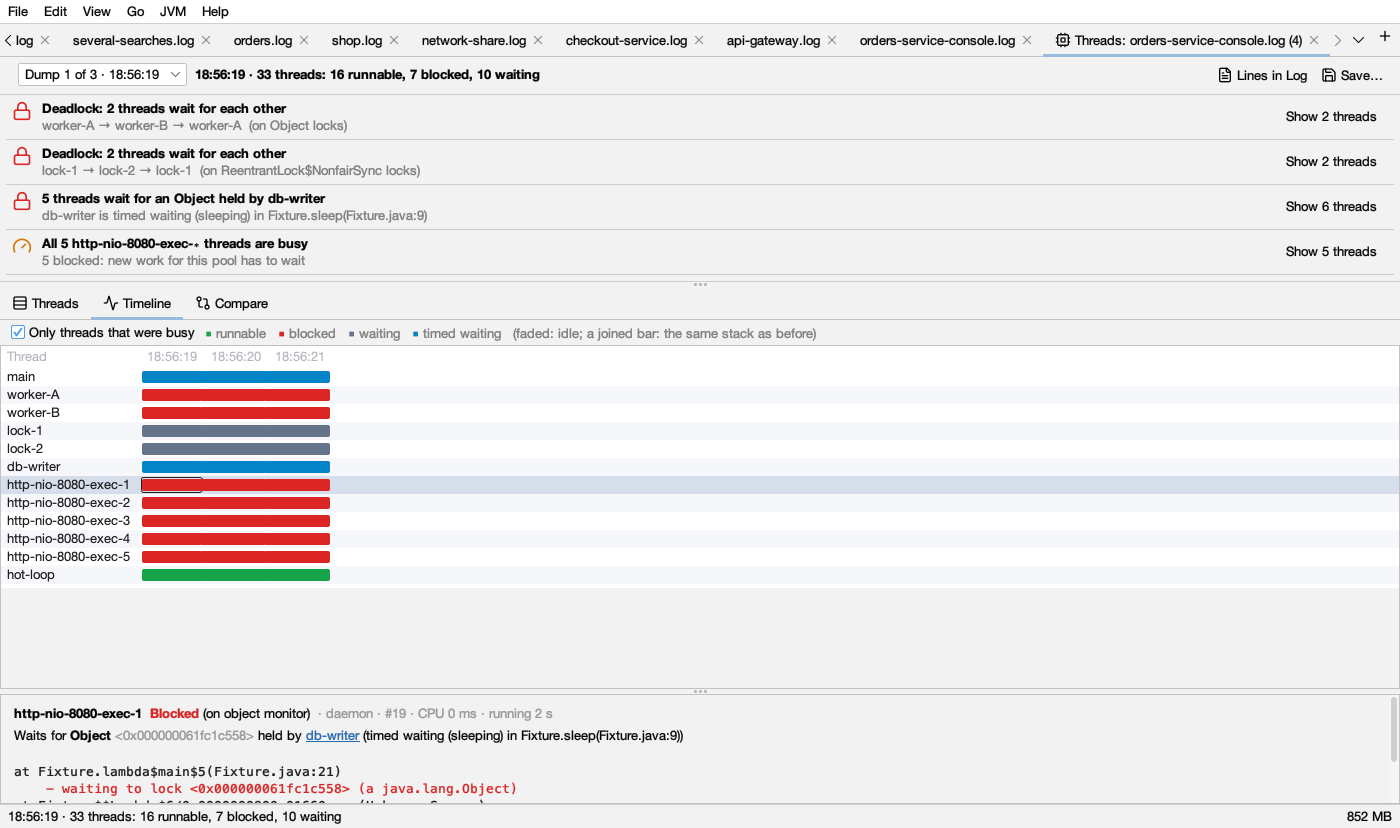
- A faded cell: the thread was idle in that dump.
- Joined cells (no gap between them): the same stack as in the dump before. A long solid bar is a thread that didn’t move, for example a long red bar is a thread blocked the whole time.
- An empty cell: the thread didn’t exist then.
- Only threads that were busy (on by default) leaves out threads that were idle in every dump.
Click a cell to see that thread’s stack in that dump.
Compare
What changed between two dumps: choose From and to. Only changes (on by default) leaves out threads doing the same thing in both.
| Change | Colour | Means |
|---|---|---|
| New | green | Not in the earlier dump |
| Changed | amber | A different state or stack |
| Gone, Same | gray | Ended, or doing the same thing |
Columns: Change, Thread, Before, After (state and place).
Threads and their log
A log and its JVM are linked (see JVM connections):
- In a log, right-click a line → Show Thread “…” in Threads shows that thread’s stack in a dump of the JVM, taking one if needed. A name the log cut short (
nio-8080-exec-1) still findshttp-nio-8080-exec-1. - In the Threads tab, Lines in Log shows only the lines that thread wrote.
Limits
HotSpot dumps are read (OpenJDK and its builds). OpenJ9 javacore files are not. A heap dump’s threads (see Heap) have no lock information.