JVM connections
Logsift can reach a running Java program to take thread dumps, profile it and look at its heap: on this computer, on a server over SSH, or through a JMX port.
Attaching to a JVM
JVM → Attach to a Running JVM… (Ctrl+Shift+J, ⇧⌘J on macOS) has three tabs. Pick a JVM and click Attach (or double-click it). A Threads tab opens with a first thread dump; from there, Profile… and Heap….
This computer
Lists the Java programs running as you: PID, Program, User, Running for, Command. Refresh looks again.
Logsift attaches the way the JDK’s own tools do. If that isn’t possible, give a JDK folder (for jcmd); Logsift then uses jcmd from it.
Server (SSH)
Host, port, user and a password or private key, as for remote logs. Click Connect to list the server’s Java programs. JVMs in containers show (in a container).
- JDK folder on the server: usually found by itself (from the PATH, or the JDK the program runs on). Servers with only a Java runtime work too: Logsift copies async-profiler to the server’s
/tmpand uses that. - Use sudo for JVMs of other users (on by default): JVMs running as
tomcatorappare reached withsudo. When sudo asks for a password, Logsift asks for it and keeps it only while it runs.
JMX port
For a JVM started with -Dcom.sun.management.jmxremote.port=9010 (and -Djava.rmi.server.hostname set to its address), from anywhere, with no SSH. Give the host (or a service:jmx: address), the port (9010 by default), SSL if the port uses it, and a user and password if it asks.
Over JMX, Logsift takes thread dumps and heap histograms, and profiles with Flight Recorder. Save Heap Dump… works too: the JVM writes the dump on its own machine, in its temporary folder. Logsift then offers to copy it here over SSH (Copy Here) and opens it, or Leave It There. async-profiler needs SSH or this computer.
A log and its JVM
A log tab shows which JVM writes the log, in a bar above it, with Threads, Profile and Heap buttons.
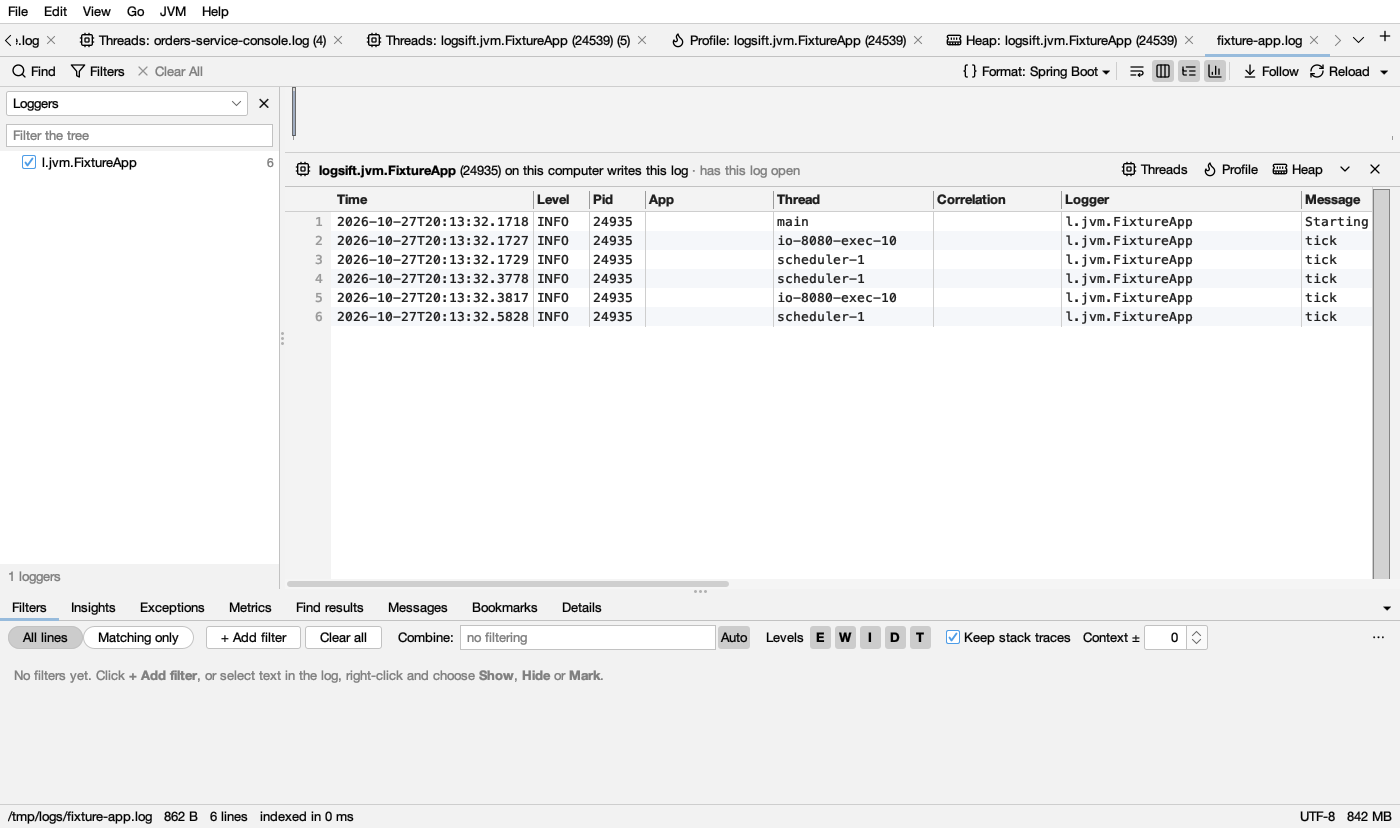
What the bar says:
| The bar says | Means | Buttons |
|---|---|---|
| program (pid) on where writes this log · why | Logsift found it: the JVM has this log open, was linked before, its process id is in the log, the log names it, or its command line names this log’s folder | Threads, Profile, Heap |
| program … · connected | Logsift is connected to it | Threads, Profile, Heap |
| Linked to program on where | You linked it before; it is on a server | Connect |
| Linked to program · not running now | You linked it before; it isn’t running | Link to a JVM… |
| This log says it was written by … or This log is on server’s shared drive | A log copied from a server or on a shared drive: Logsift read what the log says about itself (Spring Boot’s start line names the program, host and process id) | Find Its JVM… (filled in) |
How Logsift finds it:
- On this computer, and on the server of a log opened over SSH: the JVM that has the log open (Linux and macOS; on Windows, by the process id the log names), the one it was linked to before, or the one the log names.
- Any log: JVM → Link This Log to a JVM… picks the JVM by hand.
The link is remembered for the log and for the other logs in its folder, by program (orders.jar, com.acme.App), not by process id, so Logsift finds the JVM again after a restart or a new version. The bar’s ▾ menu has Link to Another JVM…, Disconnect and Unlink; ✕ hides the bar.
The bar isn’t shown for merged logs, downloads, and files from zips or .gz files.
Thread names connect the two: right-click a line → Show Thread “…” in Threads shows that thread’s stack; in the Threads tab, Lines in Log shows only the lines a thread wrote. See Thread dumps.
What each action costs a running service
Reading logs changes nothing. Reaching a running JVM can: some actions stop it for a moment, some cost CPU, memory, disk or network on its server. Logsift says the same where you start each action. From lightest to heaviest:
| Action | What the JVM or its server feels | How much |
|---|---|---|
| Opening a log | Logsift looks for the JVM that writes it: ps, and which processes have the file open |
A few small commands, once |
| Following a remote log | A check for new lines every second. Whole file reads all of it first | Light; a whole multi-GB file is a big read |
| Attach / Connect | Attaching on this computer starts the JVM’s management agent (it stays until the JVM ends). Every connection takes a first thread dump | One short stop |
| Thread dump (Take Dump, Record…) | The JVM stops while the stacks are written | Usually milliseconds; longer with thousands of threads or a big heap |
| Heap histogram | Only live objects (the default) runs a full GC first. Off, the JVM still stands still while it counts | Seconds for a big heap with a full GC; less without |
| Profile, Flight Recorder | A recording; the first one starts Flight Recorder in that JVM. It ends by itself, even if Logsift is gone | About 2–3% CPU while it runs |
| Profile, async-profiler | Loaded into the JVM for the first run, and stays loaded until the JVM ends. Native memory and Everything at once record every malloc. Calls of a method instruments the method |
From about 1% to noticeable, by mode |
| Save Heap Dump | A full GC, then the JVM stops while every object is written. The file (about the heap in use) is written on the JVM’s machine and copied here. Logsift checks the room first and refuses a folder that is too small, or a /tmp in memory |
Seconds to minutes of stop; disk the size of the heap; that much network |
| A heap dump from a log | The dump is read from the server’s disk and sent at full speed. Logsift asks first | The dump’s size, once |
| Open Heap Dump on a Server | Logsift’s heap reader runs there at low priority: 2 GB of memory, disk up to the dump’s size, some minutes of a CPU core | Heavy for a production machine: copy the dump elsewhere first |
| Copy to Another Machine | The dump is read once on the first server at low priority | The dump’s size over the network |
On a production JVM, prefer thread dumps, Flight Recorder and histograms with Only live objects off. Save a heap dump or profile native memory at a quiet time.
Logsift never removes files on a server. What it writes there stays, and Logsift says where:
- heap dumps it had the JVM write (
/tmp/logsift-*.hprofover SSH,logsift-heap-*.hprofin the JVM’s temporary folder over a JMX port), readable only by your login user; - recordings it fetched (
/tmp/logsift-*.jfr); - async-profiler itself (
/tmp/logsift-<user>-async-profiler-*), and the heap reader (~/.logsift/heap); - copies made by Copy to Another Machine, and what a stopped copy wrote so far (
NAME.part).
Remove them when you are done. The only files that go by themselves are the heap reader’s temporary index files.