logsift
Profile
A CSV file is often a table, not a log. Its columns are named as in its header row, here and everywhere else (the column titles, the tree, filters and their chips, Metrics). The Profile tab (below the log, next to Metrics) shows what each column holds: one card per column, with its kind, how many values it has, and a small chart. It is there for every CSV or TSV file; for another log with columns, right-click a column title → Profile of the Columns. Click Refresh to read the columns again after the file grew.
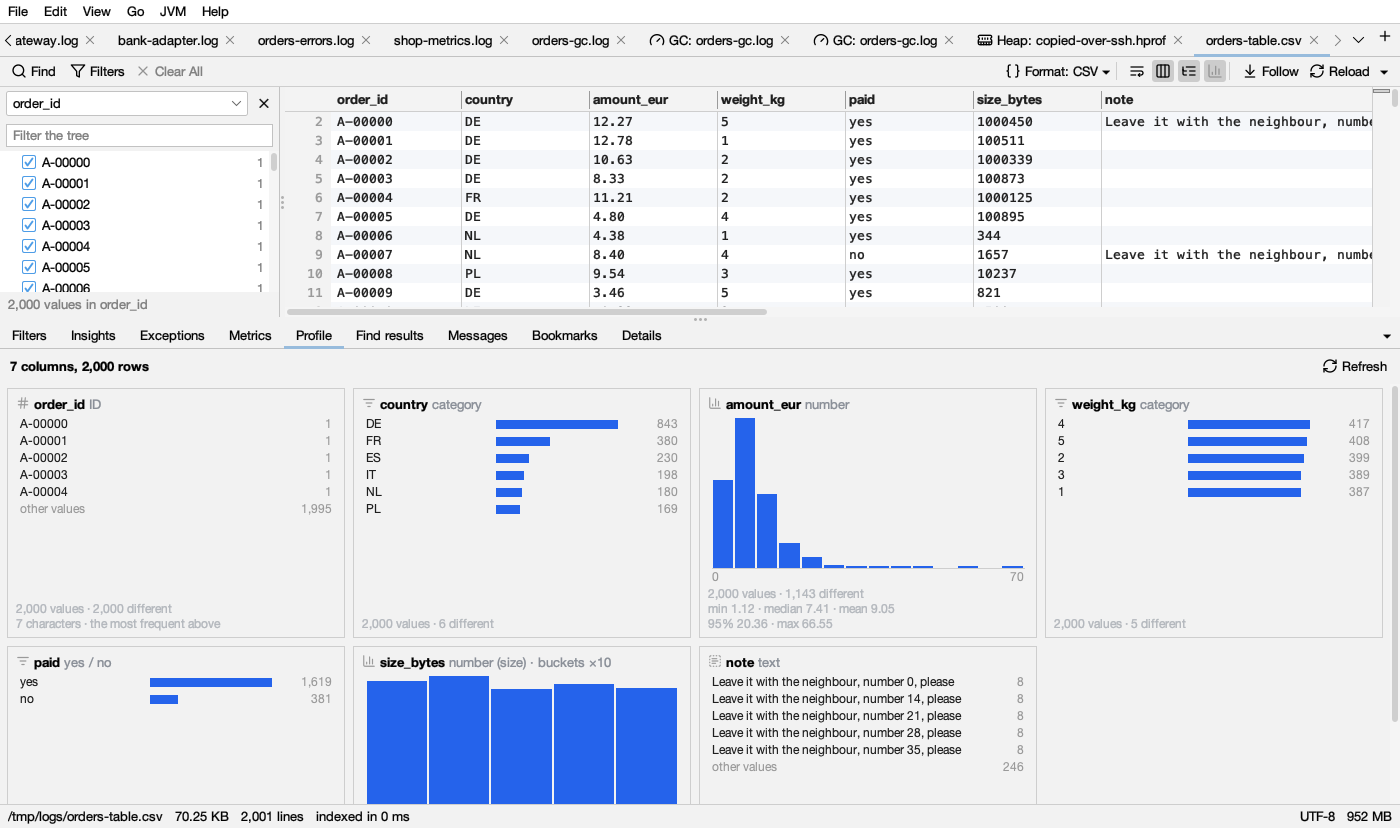
The kinds
Each column gets one kind, from its values:
| Kind | What the column holds | Its chart |
|---|---|---|
| number | Numbers (95% of its values or more), with many different values or a unit: amount, duration_ms, size_bytes. (time taken) or (size) follows when the values or the name have a unit | A histogram |
| time | Dates and times (or epoch numbers in a column named like a time) | Rows over time |
| category | Up to 20 different values that repeat: country, status, weight 1 to 5 | The 10 most frequent values as bars, then other values |
| yes / no | Two values like yes / no, true / false, 1 / 0 | Both values as bars |
| ID | Many different short values: order_id, a number in a column named id, code, key | The 5 most frequent values, no chart |
| text | Many different values with words in them: notes, messages | The 5 most frequent values, no chart |
| empty | No values at all | None |
The numbers on a card
- values, empty (with its share of the rows) and different: how many rows have a value, how many don’t (an empty cell,
-ornull), and how many different values there are (over 10,000 different when there are more). - Numbers: min, median (half are below), mean (the average), 95% (95 in 100 are below) and max. Durations are shown in ms, s or minutes, sizes in B, KB, MB or GB.
- Times: the first and last time, and how long between them.
- IDs and text: how long the values are, in characters.
The charts
| Mark | Light | Dark | Means |
|---|---|---|---|
| blue bars | How many rows have this value, or fall in this range | ||
| orange bar | The bar under the mouse | ||
| gray bar | other values: all the values not listed |
A histogram’s buckets are round numbers (0–5, 5–10, …). When a column’s numbers span several orders of magnitude (from 10 to a million, say), each bucket is ten times the one before, and the card says buckets ×10. The smallest and largest value are written under the chart. Hover a bar for its range and count.
Filtering by a click
- Click a value (a category, yes / no, an ID): a filter Show: country = DE is added on that column, and the log shows only those rows.
- Click a histogram bar: a filter Show: amount_eur between 5..<10. A value on an edge (10) belongs to the next bar, so the filter keeps exactly the rows the bar counts; the last bar includes the largest value (95..100).
- Click a bar of rows over time, for the log’s own time column: only that time range is shown.
These are filters on a column: they show as chips and can be changed in the Filters tab. With Matching only on, the Profile counts only the rows the filters keep (the strip at the top of the tab says so), and follows the filters as they change.
Big files
A file with more than 200,000 lines is read in blocks of lines from all over the file, and the Profile says so: in a sample of 200,000 of 12,400,000 lines. Counts and different are then those of the sample.
Tables without times
A CSV file without a time column has no timeline; the Timeline button is grayed and says No times in this file. The Metrics chart its columns of numbers by row instead of by time (the Time column beside the chart then gives the line). A CSV file without a message column has no messages to group: the Messages tab says so, and Insights only looks for errors and the like.